Published at: 2025-10-30
API Development
This API specification describes the ERP Data Synchronization Platform interfaces currently supported (including: 1) proactive push when heterogeneous systems create/modify records, 2) polling for incremental data by time range, and 3) passive receive of pushes from heterogeneous systems). It is intended for integration developers as the integration development reference to avoid miscommunication between parties.
1. Integration Platform: How to View / Generate APIs
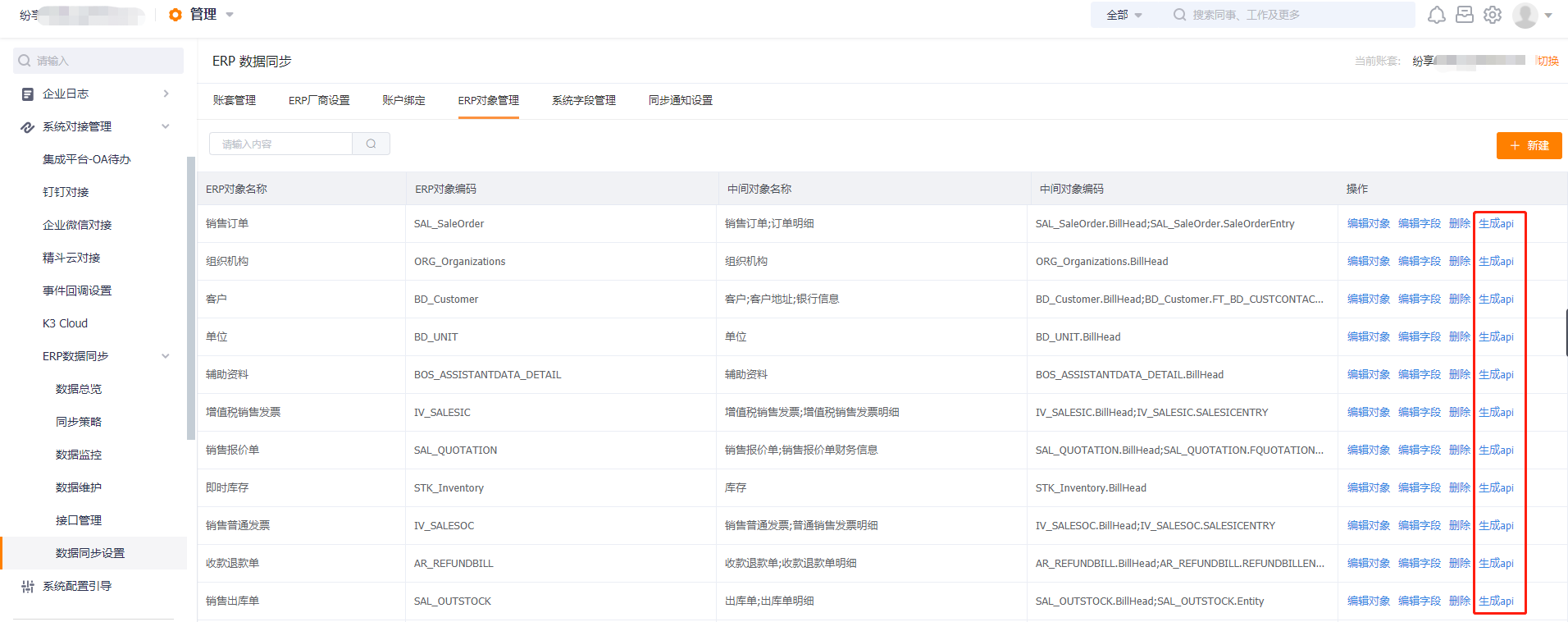
How to view an API: Log in to ShareCRM, go to Management > System Management > System Integration > ERP Data Synchronization > Data Synchronization Settings. Under the ERP Object Management tab, create a new intermediate-table object. After configuring the ERP-side object fields, return to the list and click the Generate API button in the object's action column to view the API format for that object.
 </img>
2. Integration Platform — Push
The ERP Data Synchronization Integration Platform listens to ShareCRM MQ messages. When a user creates or updates a business record in ShareCRM, the CRM sends an MQ message to the Integration Platform. After receiving the message, the platform immediately pushes the record data to the target heterogeneous system. See the Viewing/Generating APIs section for how to obtain specific interface details.
2.1 Create API
Endpoint: http://MyDoman/path/create — replace http://MyDoman/path/ and the curl URL with the ERP access path configured on the ERP vendor settings tab.
Method: POST
Data formats: xml, text, json are supported. JSON is recommended.
Request example:
curl --location --request POST 'http://MyDoman/path/create' \
--header 'Content-Type: application/json' \
--header 'token: TOKEN' \
--data-raw '{
  "objAPIName": "ERP-side object's APIName",
  "masterFieldVal": {
    "Key1": "value1",
    "Key2": "value2",
    "Key3": "value3"
  },
  "detailFieldVals": {
    "detailApiName1": [
      {
        "Key4": "value4",
        "Key5": "value5",
        "Key6": "value6"
      }
    ],
    "detailApiName2": [
      {
        "Key4": "value7",
        "Key5": "value8",
        "Key6": "value9"
      }
    ]
  }
}'
Response example:
{
  "code": "error_code",
  "message": "error_message",
  "data": {
    "masterDataId": "dataid",
    "detailDataIds": {
      "Key10": "value10",
      "Key11": "value11",
      "Key12": "value12"
    }
  }
}
2.2 Update API
Endpoint: http://MyDoman/path/update — replace http://MyDoman/path/ and the curl URL with the ERP access path configured on the ERP vendor settings tab.
Method: POST
Data formats: xml, text, json are supported. JSON is recommended.
Request example:
curl --location --request POST 'http://MyDoman/path/update' \
--header 'Content-Type: application/json' \
--header 'token: TOKEN' \
--data-raw '{
  "objAPIName": "ERP-side object's APIName",
  "masterFieldVal": {
    "Key1": "value1",
    "Key2": "value2",
    "Key3": "value3"
  },
  "detailFieldVals": {
    "detailApiName1": [
      {
        "Key4": "value4",
        "Key5": "value5",
        "Key6": "value6"
      }
    ],
    "detailApiName2": [
      {
        "Key4": "value7",
        "Key5": "value8",
        "Key6": "value9"
      }
    ]
  }
}'
Response example:
{
  "code": "error_code",
  "message": "error_message",
  "data": {
    "masterDataId": "dataid",
    "detailDataIds": {
      "Key10": "value10",
      "Key11": "value11",
      "Key12": "value12"
    }
  }
}
3. Integration Platform — Polling
The ERP Data Synchronization Platform can proactively query heterogeneous systems if those systems expose batch and single-item query endpoints. Polling means the Integration Platform issues GET requests to the heterogeneous system's batch query endpoint at regular intervals to retrieve incremental data in a given time window. The minimum polling interval configurable in the UI is 6 minutes. See the Viewing/Generating APIs section for how to obtain endpoint details.
3.1 Batch Query Request
Endpoint: http://MyDoman/path/queryMasterBatch?objAPIName=ERPObjectAPIName&startTime=start_timestamp_ms&endTime=end_timestamp_ms&includeDetail=true&offset=offset&limit=limit — replace http://MyDoman/path/ and the curl URL with the ERP access path configured on the ERP vendor settings tab.
Method: GET
Return formats: xml, text, json are supported. JSON is recommended.
Request example:
GET http://MyDoman/path/queryMasterBatch?objAPIName=ERPObjectAPIName&startTime=start_timestamp_ms&endTime=end_timestamp_ms&includeDetail=true&offset=offset&limit=limit
Response example:
{
  "code": "error_code",
  "message": "error_message",
  "data": {
    "totalNum": "total_records",
    "dataList": [
      {
        "objAPIName": "ERP-side object's APIName",
        "masterFieldVal": {
          "Key1": "value1",
          "Key2": "value2",
          "Key3": "value3"
        },
        "detailFieldVals": {
          "detailApiName1": [
            {
              "Key4": "value4",
              "Key5": "value5",
              "Key6": "value6"
            }
          ],
          "detailApiName2": [
            {
              "Key4": "value7",
              "Key5": "value8",
              "Key6": "value9"
            }
          ]
        }
      }
    ]
  }
}
3.2 Single-item Query Request
Endpoint: http://MyDoman/path/queryMasterById?objAPIName=ERPObjectAPIName&dataId=data_id&includeDetail=true — replace http://MyDoman/path/ and the curl URL with the ERP access path configured on the ERP vendor settings tab.
Method: GET
Return formats: xml, text, json are supported. JSON is recommended.
Request example:
GET http://MyDoman/path/queryMasterById?objAPIName=ERPObjectAPIName&dataId=data_id&includeDetail=true
Response example:
{
  "code": "error_code",
  "message": "error_message",
  "data": {
    "objAPIName": "ERP-side object's APIName",
    "masterFieldVal": {
      "Key10": "value10",
      "Key11": "value11",
      "Key12": "value12"
    },
    "detailFieldVals": {
      "detailApiName1": [
        {
          "Key13": "value13",
          "Key14": "value14",
          "Key15": "value15"
        }
      ],
      "detailApiName2": [
        {
          "Key13": "value16",
          "Key14": "value17",
          "Key15": "value18"
        }
      ]
    }
  }
}
4. Integration Platform — Receive (Passive)
When heterogeneous systems create or update business records, they can push data to the ERP Data Synchronization Platform in two formats: standard format or non-standard format. Under the passive receive mode, the pushed request's Header parameters must follow one of these two formats. If the heterogeneous system actively pushes data, we recommend using the standard format. See the Viewing/Generating APIs section for how to obtain endpoint details.
Push execution logic: The external interface actively calls the Integration Platform's push endpoint to write data into the platform's cache. The platform then asynchronously pulls data from the cache table for processing. If writing to the cache table fails, the API returns an error immediately. If processing fails after pulling from the cache, check the Integration Platform's Data Maintenance UI for error details.
Note: Standard vs. non-standard is determined by the pushed payload format. Both formats require certain Header parameters (the standard format requires a data id via the header). The non-standard format places no constraints on the body. The standard format requires the body to follow the platform's expected structure. Details follow.
4.1 Standard-format Push
Endpoint: https://www.fxiaoke.com/erp/syncdata/open/objdata/asyncpush
Method: POST
Data format: JSON only.
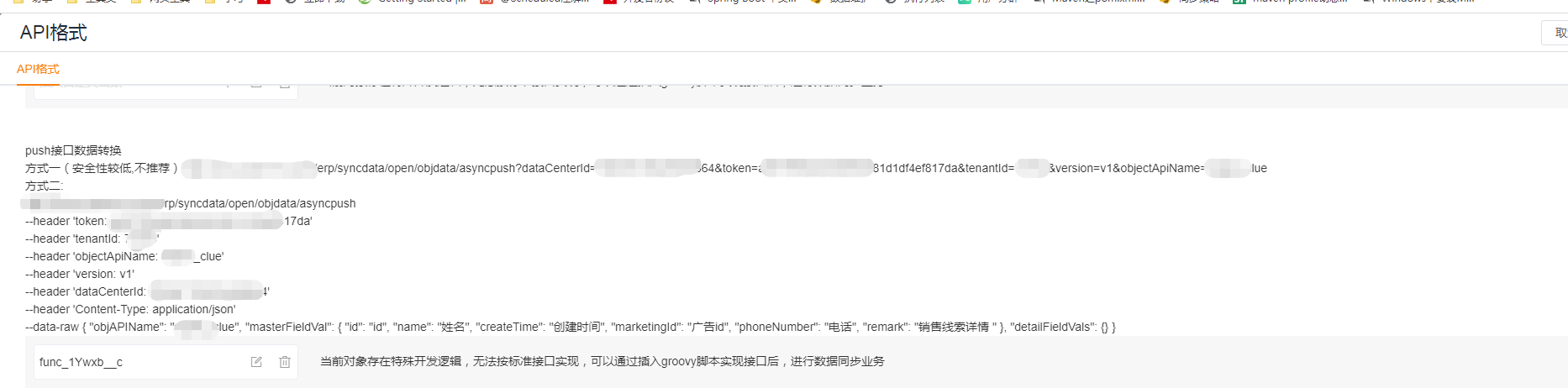
Request Header parameters: (You can get the parameter values by clicking Generate API for any ERP object in the ERP object list and viewing the push API details.)
| Field | Description |
| token | Request authentication string [contact ShareCRM development to obtain] |
| tenantId | ShareCRM tenant ei |
| dataCenterId | Not required for single company; required and must be provided for multi-ledger deployments |
| objectApiName | Actual ERP object name. Find it via Data Synchronization Settings → ERP Object Settings → ERP Object Code |
| version | v1 |
| operationType | 3 = voided/canceled. For other operations this header is not required. |
| id (lowercase id) | Indicates standard-format transmission. If id is non-empty, the platform treats the request as standard format. If id is empty, the platform applies custom adapter logic. Important: if id is non-empty but the body does not match the platform standard structure, parsing errors will occur. |
 </img>
 </img>
Standard body format:
Request example:
{
  "objAPIName": "ERP-side object's APIName",
  "masterFieldVal": {
    "Key1": "value1",
    "Key2": "value2",
    "Key3": "value3"
  },
  "detailFieldVals": {
    "detailApiName1": [
      {
        "Key4": "value4",
        "Key5": "value5",
        "Key6": "value6"
      }
    ],
    "detailApiName2": [
      {
        "Key4": "value7",
        "Key5": "value8",
        "Key6": "value9"
      }
    ]
  }
}
Response example (success errCode = s106240000; other values indicate failure):
{
  "errCode": "s106240000",
  "errMsg": "success"
}
4.2 Non-standard-format Push
Endpoint: https://www.fxiaoke.com/erp/syncdata/open/objdata/asyncpush
Data formats: xml, text, json are supported. JSON is recommended.
Request Header parameters:
| Field | Description |
| token | Request authentication string [contact ShareCRM development to obtain] |
| tenantId | ShareCRM tenant ei |
| dataCenterId | Not required for single company; required and must be provided for multi-ledger deployments |
| objectApiName | Actual ERP object name. Find it via Data Synchronization Settings → ERP Object Settings → ERP Object Code |
| version | v1 |
| operationType | 3 = voided/canceled. For other operations this header is not required. |
Request body: no constraints (the platform will accept arbitrary body schema when operating in non-standard mode).
Response example (success errCode = s106240000; other values indicate failure):
{
  "errCode": "s106240000",
  "errMsg": "success"
}
5. Data Mapping Table — Open API Capabilities
Custom functions can insert, update, and query the data mapping table. Example usage:
Map header=[:] // create header map
Map param1=["ployDetailId":"155bd981457343f291e0edc13776217f", // policy detail id; if the policy is deleted and recreated, update this value
"sourceObjectApiName":"AccountObj", // source object APIName; update if it changes
"destObjectApiName":"BD_Customer.BillHead", // destination object APIName (virtual); update if it changes
"sourceDataId":"sourceDataId123", // source object data id
"destDataId":"destDataId123666", // destination object data id
"sourceDataName":"sourceDataName3666", // source object's name property
"destDataName":"destDataName66", // destination object's name property
"remark":"remark1341"]; // remark
def result1=Fx.proxy.callAPI(“erp.syncData.createSyncDataMapping”,header,param1); // [false, HttpResult(statusCode=200, content={“errCode”:”s106240000”,”errMsg”:”success”}, bytes=null), ] s106240000 indicates success, others indicate failure
log.info(result1)
// Update destination data id based on source data id
Map param2=[“sourceObjectApiName”:”AccountObj”,
“destObjectApiName”:”BD_Customer.BillHead”,
“sourceDataId”:”sourceDataId123”,
“destDataId”:”destDataId123666”]
def result2=Fx.proxy.callAPI(“erp.syncData.updateSyncDataMapping”,header,param2);
log.info(result2)
// Query whether source data ids have mapping
Map param3=[“sourceObjectApiName”:”AccountObj”,
“destObjectApiName”:”BD_Customer.BillHead”,
“sourceDataId”:[“sourceDataId123”]] // list of sourceDataIds
def result3=Fx.proxy.callAPI(“erp.syncData.getSyncDataMappingBySourceDataId”,header,param3);
// Example return: {“data”:{“sourceDataId123”: {“sourceDataId”:”sourceDataId123”,”isCreated”:true,”destDataId”:”destDataId123666”,”sourceDataName”:”sourceDataName1233”,”updateTime”:1611047455451,”lastSyncStatus”:6,”destTenantId”:”81138”,”sourceObjectApiName”:”AccountObj”,”destObjectApiName”:”BD_Customer.BillHead”,”sourceTenantId”:”81138”,”id”:”aa46ed320312476485e932a1ca4b4263”,”lastSyncDataId”:”92c86fb175254e54b990bd86b6ce1145”,”status”:1}},”errCode”:”s106240000”,”errMsg”:”success”}
// s106240000 indicates success. The data map keys are sourceDataIds, values are the mapping detail.
log.info(result3)</code>
6. Custom Function: Create ERP Field Mapping Table
// channel valid values: ERP_K3CLOUD, ERP_SAP, ERP_U8, OA, STANDARD_CHANNEL
// "dataType":"employee" indicates the mapping entry is for a person
// dataCenterId is the data center id
// fsDataId is the CRM data id. For employees, this is the employee ID (not the CRM user object id).
// erpDataId is the ERP-side data id
// fsDataName is the CRM data name
// erpDataName is the ERP data name
Map data = [“dataCenterId”:”data_center_id”, “channel”:”ERP_K3CLOUD”,”dataType”:”employee”, “fsDataId”:”fsDataId”,”fsDataName”:”fsDataName”,”erpDataId”:”erpDataId”,”erpDataName”:”erpDataName”];
def ret = Fx.proxy.callAPI(“erp.syncData.createErpfieldmapping”, [:], data);
Fx.log.info(“ret is : “+ret)</code>