Published at: 2025-10-30
1.1 [CRM Task OA] OA Functions
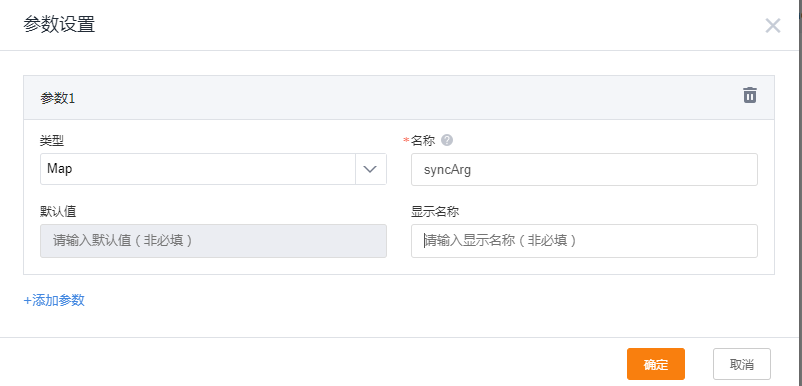
Function input parameter is standardized as syncArg:
 </img>
1. Modify Request
(1) New-version function: modify header, modify url, modify body, execute OA request directly
log.info("Before input: Integration Platform function input" + Fx.json.toJson(syncArg))
log.info("Before input: " + syncArg)
String requestDataStr = syncArg["requestData"] as String; // request body
Map requestData = Fx.json.parse(requestDataStr);
requestData.put(“remark”, “test111”)
log.info(“Transformed syncArg: “ + requestData)
String urldata = syncArg[“url”] as String; // request URL, can be dynamic
Map headerMap = syncArg[“header”] as Map;
headerMap.put(“external”,”test”); // return header
// Call OA API, get OA API response
Map result = [“code”:200,”message”:”success”] // When executing OA request directly in this function, return this parameter; do not return it in other scenarios.
return [“requestData”:requestData,”header”:headerMap,”url”:urldata,”result”:result]; // fixed return parameter format</code>
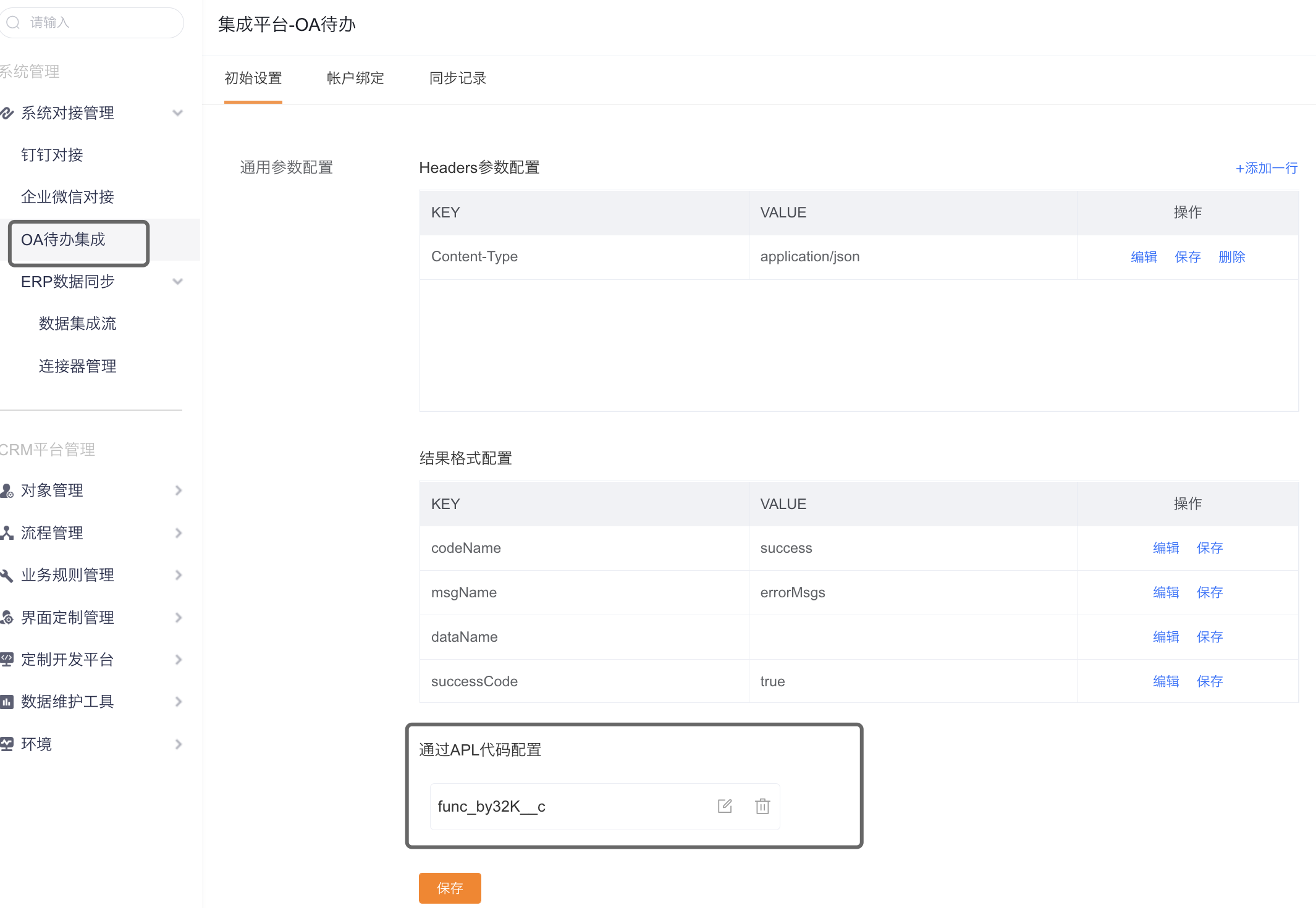
Add entry point:
 </img>
(2) Header function (deprecated — refer to New-version function)
Purpose: When the remote OA platform requires the Integration Platform to send OA messages and each request must include different header parameters, use this function to generate those headers.
Function exampleString token = “header data to return”
return [“key”:token] // return a map</code>
Add entry point:
</img>(3) Body function (deprecated — refer to New-version function)
Purpose: Use this function when the remote OA platform requires special logic to transform the request body.
Add entry point: same as above.
Function examplelog.info(“Before input: Integration Platform function input” + Fx.json.toJson(syncArg))
log.info(“Before input: “ + syncArg)
Map syncArgAfter = [:]
String requestDataStr = syncArg[“request_data”] as String;
Map requestData = Fx.json.parse(requestDataStr);
// requestData.put(“taskId”, (requestData[“taskId”] as String)+(requestData[“thirdReceiverId”]!=null?requestData[“thirdReceiverId”] as String:””)) // special parameter transformation logic
log.info(“Transformed syncArg: “ + requestData)
return [“request_data”:requestData]; // fixed return parameter format — deprecated, refer to New-version function</code>
(4) URL function (deprecated — refer to New-version function)
Purpose: Use this function when the remote OA platform requires the Integration Platform to include different parameters in the request URL for each request.
Function examplelog.info(syncArg)
String url=syncArg.url; // get original url passed by Integration Platform
// TODO: implement enterprise-specific token retrieval, then append to url and return to Integration Platform
return [“url”:url] // return a map with fixed key “url”</code>
Add entry point: currently no page to configure URL function; contact developers to embed it.
2. Single Sign-On to CRM from Task Notifications
Purpose: When a user clicks a task notification in OA, perform a security validation with the remote system to obtain the OA account identity. The Integration Platform can map that OA account to the corresponding ShareCRM Account and enable SSO without requiring the user to log in again.
Prerequisite for SSO function call
URL example https://www.fxiaoke.com/erp/syncdata/open/oa/authorize/common/#F028/#F037/#F015/false
URL parameter mapping: https://www.fxiaoke.com/erp/syncdata/open/oa/authorize/common/{ei}/{apiName}/{dataId}/{isApp}
({} explains the meaning of placeholders above)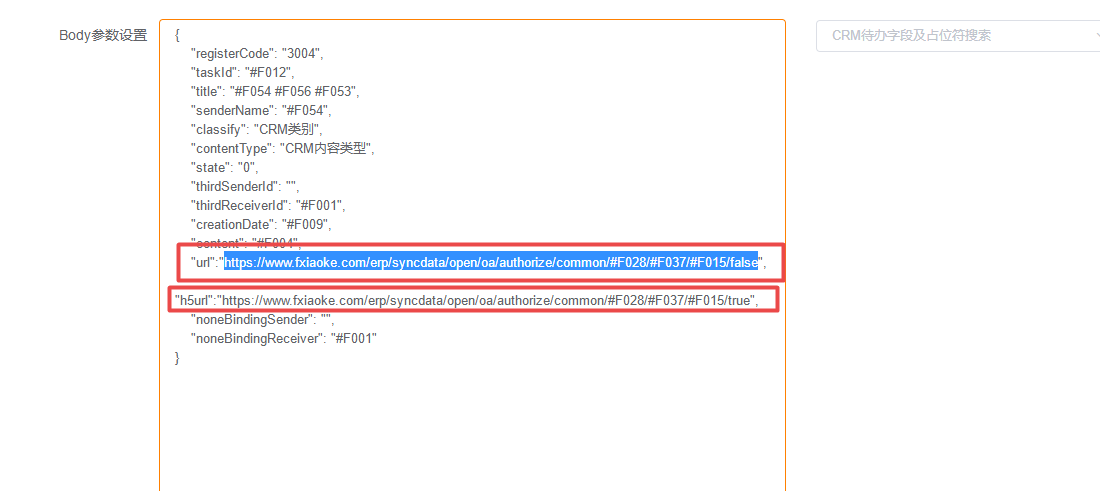 </img>
Function exampleString url = syncArg[“oaConnectParam”][“ssoAuthUrl”] as String;
log.info(“url:”+url)
String ticket = syncArg[“params”][“requestParams”][“v5ticket”] as String;
log.info(“ticket:”+ticket);
def(Boolean error,HttpResult data,String errorMessage) = Fx.http.get(url+ticket, null, 2000, true, 2, false);
log.info(“data:”+data[“content”] as String);
String content = data[“content”] as String;
syncArg.put(“oaUser”,content.trim()); // must return oaUser as the third-party account key
log.info(“syncArg:”+Fx.json.toJson(syncArg));
return syncArg;</code>
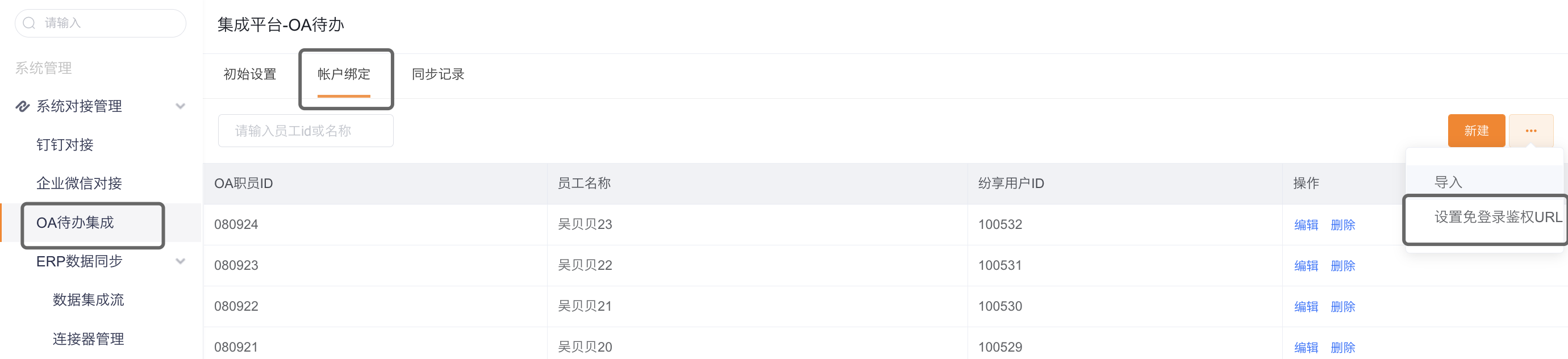
Add entry point:
 </img>
3. SSO to CRM from External Portal
Scenario: A customer wants to add an app to an OA portal. Clicking the app should use OAuth 2.0 to SSO into ShareCRM main page.
Step 1: Configure the app URL as:
https://www.fxiaoke.com/erp/syncdata/open/oa/authorize/common/login?ei={enterprise numeric id}
You can append additional parameters to this URL
/**
 * author: ajman
 * Generic SSO
 */
 log.info("syncArg:"+syncArg) // parse custom parameters, e.g. authentication parameter "ticket"
String userAgent = syncArg["params"]["headers"]["user-agent"]  as String;
log.info("userAgent:"+userAgent)
String ticket = syncArg["params"]["ticket"]  as String;
boolean isApp = syncArg["params"]["requestParams"]["isApp"]  as Boolean;
log.info("ticket for URL flow:"+ticket);
// The ticket should be validated against the remote system to obtain the ERP user account.
// Implement this call and set the returned account into oaUser.
// After requesting the OA platform for the OA user account, return oaUser. Default redirect is to ShareCRM home.
syncArg.put(“oaUser”,”oaUser, replace this”);
String redirectUrl=””;
if(isApp){
// basic check for mobile
redirectUrl=’https://www.fxiaoke.com/XV/UI/Home#crm/index’;
}else{
redirectUrl=’https://www.fxiaoke.com/hcrm/avah5’; // depends on new base home page
}
log.info(“CRM redirect URL:”+redirectUrl)
syncArg.put(“redirectUrl”,redirectUrl); // must return the specified redirect URL
log.info(“syncArg:”+Fx.json.toJson(syncArg));
return syncArg;</code>